• The new Python extension is now available. It allows customers to deploy and manage WSGI-based Python applications on their websites directly from Plesk.
  • The Plesk Mobile apps for iOS and Android and the Plesk Mobile Center extension have been deprecated, and are no longer available for new installations. In Plesk Obsidian 18.0.84, the Plesk Mobile Center extension will be removed from servers during the upgrade, and the Plesk Mobile apps will lose their server management features.
  • The Social Login extension has been deprecated and will be removed in Plesk Obsidian 18.0.84. After that, it will no longer be possible to log in to Plesk with a Google, Facebook, GitHub account, or with a passkey. Plesk usernames and passwords, as well as logging in with a WebPros Account, are not affected.

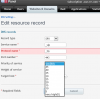
Values in Priority of Service and Weight of Service in SRV Records

Status
Not open for further replies.

SalehA

New Pleskian
hi,


we are currently using Parallel Plesk 11.0 version and there is one requirement from microsoft provider to add the exact same values in SRV Records.

Priority of Service = 100
Weight of Service = 1

but these values are not available in the dropdownlist. attached are the screenshots.

So kindly please provide solution for the above concern.
 

Attachments

  • priority of service.png
    priority of service.png
    32.2 KB · Views: 14
  • weight of Service.png
    weight of Service.png
    34.1 KB · Views: 12

Attachments

  • cmdparallelerror.jpg
    cmdparallelerror.jpg
    38.4 KB · Views: 6
hi,

I tried to add the SRV Records manually through command prompt but I am getting the below error also i want to know that does Plesk 11.0 Version supports this command ?

cmdparallelerror.jpg
 
hi,

I have check the documents and tried to use the below command and still I am getting error.

dns.exe --add mydomain.com -srv '' -srv-service _sip -srv-target-host server.com. -srv-protocol _tls -srv-port 5060 -srv-priority 100 -srv-weight 1

cmdparallelerror.jpg
 
Try to set up these settings for this SRV record directly in dns_recs table of psa database and ther run

dnsmng.exe update *
 
hi,


can you guide me on how to navigate to psa database for updating dns_recs table.

Thanks for your response.
 
Status
Not open for further replies.
Back
Top