
 Facebook
 Twitter
- Server operating system version
- Alma Linux 9.7
- Plesk version and microupdate number
- Plesk obsidian 18.0.76#3
In the PHP Setting page on the Plesk domain account it shows the following:
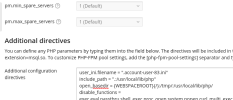
With open_basedir set as per Plesk Documentation: https://support.plesk.com/hc/en-us/...h-to-the-open-basedir-option-for-Plesk-domain
BUT the cronjob in this account dumps errors to the following location:
/var/www/vhosts/account-one.co.uk/error_log83.log

The CalProcessing.php file shows this:
How do we get Cron Jobs to correctly identify the specific account directory? Why doesn't {WEBSPACEROOT} as per the Plesk Documentation work?!
There is no commonality between account-one.co.uk and another-account.co.uk , they're not in the same subscription, not in the same owner. Nothing.
With open_basedir set as per Plesk Documentation: https://support.plesk.com/hc/en-us/...h-to-the-open-basedir-option-for-Plesk-domain
BUT the cronjob in this account dumps errors to the following location:
/var/www/vhosts/account-one.co.uk/error_log83.log
[20-Mar-2026 10:29:45 Europe/London] PHP Warning: error_log(): open_basedir restriction in effect. File(/var/www/vhosts/account-one.co.uk/error/cron_reports.txt) is not within the allowed path(s): (/var/www/vhosts/another-account.co.uk/:/tmp/:/usr/local/lib/php/) in /var/www/vhosts/account-one.co.uk/cronz/calProcessing.php on line 20
The CalProcessing.php file shows this:
Code:
$sdr = "/var/www/vhosts/account-one.co.uk/public_html";
$errorLog = "/var/www/vhosts/account-one.co.uk/error/cron_reports.txt";
require "class.dbxlink.inc.php";

error_log("error reported ok", 3, $errorLog); //line 20
How do we get Cron Jobs to correctly identify the specific account directory? Why doesn't {WEBSPACEROOT} as per the Plesk Documentation work?!
There is no commonality between account-one.co.uk and another-account.co.uk , they're not in the same subscription, not in the same owner. Nothing.
