• The APS Catalog has been deprecated and removed from all Plesk Obsidian versions.
    Applications already installed from the APS Catalog will continue working. However, Plesk will no longer provide support for APS applications.
  • Please be aware: with the Plesk Obsidian 18.0.78 release, the support for the ngx_pagespeed.so module will be deprecated and removed from the sw-nginx package.

Issue {WEBSPACEROOT} is the wrong directory. How do we fix this?

MHC_1

Regular Pleskian
Server operating system version
Alma Linux 9.7
Plesk version and microupdate number
Plesk obsidian 18.0.76#3
In the PHP Setting page on the Plesk domain account it shows the following:
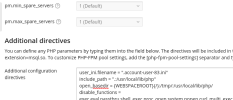
Screenshot from 2026-03-20 10-32-19.png

With open_basedir set as per Plesk Documentation: https://support.plesk.com/hc/en-us/...h-to-the-open-basedir-option-for-Plesk-domain

BUT the cronjob in this account dumps errors to the following location:

/var/www/vhosts/account-one.co.uk/error_log83.log

[20-Mar-2026 10:29:45 Europe/London] PHP Warning: error_log(): open_basedir restriction in effect. File(/var/www/vhosts/account-one.co.uk/error/cron_reports.txt) is not within the allowed path(s): (/var/www/vhosts/another-account.co.uk/:/tmp/:/usr/local/lib/php/) in /var/www/vhosts/account-one.co.uk/cronz/calProcessing.php on line 20

Screenshot from 2026-03-20 10-34-05.png


The CalProcessing.php file shows this:

Code:
$sdr = "/var/www/vhosts/account-one.co.uk/public_html";
$errorLog = "/var/www/vhosts/account-one.co.uk/error/cron_reports.txt";
require "class.dbxlink.inc.php";

error_log("error reported ok", 3, $errorLog); //line 20


How do we get Cron Jobs to correctly identify the specific account directory? Why doesn't {WEBSPACEROOT} as per the Plesk Documentation work?!

There is no commonality between account-one.co.uk and another-account.co.uk , they're not in the same subscription, not in the same owner. Nothing.
 
Unfortunately (and frustratingly) Plesk doesn't load the domain specific PHP configuration when executing Cron Jobs.

I posted a possible workaround for this scenario here.
 
Unfortunately (and frustratingly) Plesk doesn't load the domain specific PHP configuration when executing Cron Jobs.

I posted a possible workaround for this scenario here.

Ok, Thank you. I'll see what I can do with that, thank you @Kaspar .

However, I am still unclear how the cron job plesk runs specifically references another domain?!?! I've looked in the /etc/php.ini file which says:

Code:
open_basedir = /var/www/vhosts/account-one.co.uk/:tmp/:/usr/local/lib/php/

Which is correct.


Still very confused why PHP for the cronjob is referencing another account.
 
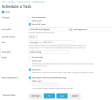
Where did you create the task? In the domain Schedule task page or in Tools & Settings? In Tools & Settings (/admin/scheduler/add-task) you also need to specify the correct system user.

How is the cron task configured? Run a command, Fetch a URL or Run a PHP script?
 
Where did you create the task? In the domain Schedule task page or in Tools & Settings? In Tools & Settings (/admin/scheduler/add-task) you also need to specify the correct system user.

How is the cron task configured? Run a command, Fetch a URL or Run a PHP script?

The task is set in the Domain Scheduled Tasks Scheduler. It is set as a "PHP Script" with the script and Cron job timing specified.
 

Attachments

  • Screenshot from 2026-03-20 15-36-08.png
    Screenshot from 2026-03-20 15-36-08.png
    86.2 KB · Views: 4
You'll have to choose the "Run a command" task type for the cron job, and call PHP to run your script that way. For example with the following command:
Code:
/opt/plesk/php/8.3/bin/php -c /var/www/vhosts/system/account-one.co.uk/etc/php.ini /var/www/vhosts/system/account-one.co.uk/cronz/calProcessing.php
 
Last edited:
You'll have to choose the "Run a command" task type for the cron job, and call PHP to run your script that way. For example with the following command:
Code:
/opt/plesk/php/8.3/bin/php -c /var/www/vhosts/system/account-one.co.uk/etc/php.ini /var/www/vhosts/system/account-one.co.uk/cronz/calProcessing.php

I have tried this but now get no response (either success or failure) from the cron or the script. There are no errors visible or in logs that I can see.
 
Your PHP script is not in /var/www/vhosts/system. Only the website php.ini.

Code:
/opt/plesk/php/8.3/bin/php -c /var/www/vhosts/system/account-one.co.uk/etc/php.ini /var/www/vhosts/account-one.co.uk/cronz/calProcessing.php
 
Back
Top