Facebook
 Twitter
Merklynn
New Pleskian
- Server operating system version
- Ubuntu 24.04.4 LTS
- Plesk version and microupdate number
- Plesk Obsidian 18.0.77 Update #1
I have a WordPress website (WP v6.9.4) and I am trying to change the PHP Time Limit, Post Max Size and Max Upload Size settings.
Using the Plesk interface and selecting the PHP button in the Dev Tools and change the values accordingly in the drop down menus. Unfortunately, the settings I set do not save.
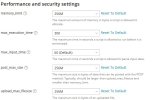
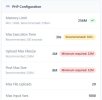
I have selected PHP 8.4.19, run PHP as FPM application served by Apache, but, various plugins within WordPress tell me I am using PHP 8.3.30.

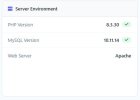
In the php.ini file, it is also reporting I am using PHP8.3.30
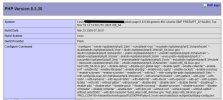
The URL for the php.ini file is:
So, I have tried:
Switching PHP versions, from PHP8.2.30 and then back to PHP8.4.19, and I get an error:
Error: phpinimng failed: Job for plesk-php82-fpm.service failed because the control process exited with error code.
See "systemctl status plesk-php82-fpm.service" and "journalctl -xeu plesk-php82-fpm.service" for details.
ERROR hp_fpm:Failed to start plesk-php82-fpm service, pause before retry
Job for plesk-php82-fpm.service failed because the control process exited with error code.
See "systemctl status plesk-php82-fpm.service" and "journalctl -xeu plesk-php82-fpm.service" for details.
Failed to start plesk-php82-fpm service

In Tools and Settings > PHP Settings, I’ve disabled PHP8.3.30, hoping to ‘force’ Plesk use PHP8.4.19, no luck. The website is still running, even after I’ve disabled PHP8.3. I have restarted the PHP service in the Services Management, again, no luck.
Is this an issue with Plesk or WordPress? It seems no matter what I do, the website is ‘stuck’ in PHP8.3. Is there a ‘preference’ or settings file I can delete?
Any help is apricated, but, my terminal and SSH skills are beginner.
Thank you.
Merklynn
Using the Plesk interface and selecting the PHP button in the Dev Tools and change the values accordingly in the drop down menus. Unfortunately, the settings I set do not save.
I have selected PHP 8.4.19, run PHP as FPM application served by Apache, but, various plugins within WordPress tell me I am using PHP 8.3.30.
In the php.ini file, it is also reporting I am using PHP8.3.30
The URL for the php.ini file is:
So, I have tried:
Switching PHP versions, from PHP8.2.30 and then back to PHP8.4.19, and I get an error:
Error: phpinimng failed: Job for plesk-php82-fpm.service failed because the control process exited with error code.
See "systemctl status plesk-php82-fpm.service" and "journalctl -xeu plesk-php82-fpm.service" for details.
ERROR
hp_fpm:Failed to start plesk-php82-fpm service, pause before retryJob for plesk-php82-fpm.service failed because the control process exited with error code.
See "systemctl status plesk-php82-fpm.service" and "journalctl -xeu plesk-php82-fpm.service" for details.
Failed to start plesk-php82-fpm service
In Tools and Settings > PHP Settings, I’ve disabled PHP8.3.30, hoping to ‘force’ Plesk use PHP8.4.19, no luck. The website is still running, even after I’ve disabled PHP8.3. I have restarted the PHP service in the Services Management, again, no luck.
Is this an issue with Plesk or WordPress? It seems no matter what I do, the website is ‘stuck’ in PHP8.3. Is there a ‘preference’ or settings file I can delete?
Any help is apricated, but, my terminal and SSH skills are beginner.
Thank you.
Merklynn