Facebook
 Twitter
I am using windows 2019. I did not install any custom components.
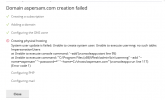
I'm getting this error when I want to add a new domain.
Does anyone have any knowledge on the subject?
I'm getting this error when I want to add a new domain.
Creating physical hosting
System user update is failed: Unable to create system user: Unable to execute usermng: no such table: ImpersonationUsers
at Unable to execute console command: '--add'(vconsoleapp::start line 95)
at Unable to execute command: '"C:\Program Files (x86)\Plesk\admin\bin\usermng" --add "--name=barbunftp" "--password=*" "--home=C:/ vhosts/babuntrade.com"'(vconsoleapp::run line 117)
(Error code 1)
I found the below command in my research and ran it. This command also throws an error."%plesk_cli%\repair.exe" --synchronize-impersonation-storage
usermng failed: no such table: ImpersonationUsers
at Unable to execute console command: '--sync-impersonation-cache'(vconsoleapp::start line 95)
at Unable to execute command: '"C:\Program Files (x86)\Plesk\admin\bin\usermng" --sync-impersonation-cache "--config=C:/Program Files (x86)/Plesk/PrivateTemp/usr06f76849.tmp"'(vconsoleapp::run line 117)
(Error code 1)
Does anyone have any knowledge on the subject?