Follow along with the video below to see how to install our site as a web app on your home screen.
Note: This feature may not be available in some browsers.
The APS Catalog has been deprecated and removed from all Plesk Obsidian versions. Applications already installed from the APS Catalog will continue working. However, Plesk will no longer provide support for APS applications.
Please be aware: with the Plesk Obsidian 18.0.78 release, the support for the ngx_pagespeed.so module will be deprecated and removed from the sw-nginx package.
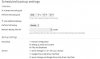
How can I make the following configuration in Plesk:
FTP Backup: Weekly
Backup via Google Drive: Daily
PS: In this specific print you can see that you do not have the option to select the FTP server. This print is for reference only. For personal reasons, I still do not have the FTP credentials.
This cannot be done via GUI, because in GUI you always need to decide for either one. But you can create your own crontab job that runs the client (console) utility to do additional backups. pleskbackup: Backing Up Content and Configuration
I've seen this page, however the problem with this utility is that it does not allow me to configure the rotation of backups. For example, I could create a weekly cron to send my backup via FTP using this utility ... ok!
But I could not put something in the command that simply tells Plesk "The number of maximum allowed backups on this FTP account is 4. If you have 4 backups, delete the oldest backup and create a new one to replace it." I may be wrong, but is this option available?
For the rotation you wil need to write your own script that logs in to the FTP account, reads the backup files (counts them) and deletes the oldest if the criteria for deletion are met.