• The APS Catalog has been deprecated and removed from all Plesk Obsidian versions.
    Applications already installed from the APS Catalog will continue working. However, Plesk will no longer provide support for APS applications.
  • Please be aware: with the Plesk Obsidian 18.0.78 release, the support for the ngx_pagespeed.so module will be deprecated and removed from the sw-nginx package.

Resolved apt-key depreciated

Compi

Basic Pleskian
Server operating system version
Ubuntu 22.04 LTS
Plesk version and microupdate number
18.0.44
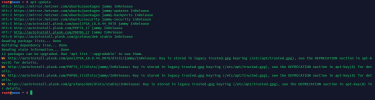
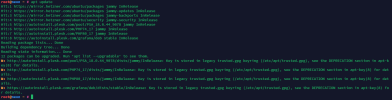
Hello, I was about to update my Server, but it tells me the apt key is depreciated:
1656679763844.png

What would be the correct fix in this situation?

Thanks!
 

Attachments

  • 1656679722010.png
    1656679722010.png
    88.8 KB · Views: 6
Hi,

This is a known issue.

Please have a look at this thread:
 
The warning message is caused by missing or corrupted plesk.gpg file in /etc/apt/trusted.gpg.d
It is possible to re-install the key running the following command:
Code:
# curl -s https://autoinstall.plesk.com/plesk.gpg | gpg --no-default-keyring --keyring gnupg-ring:/etc/apt/trusted.gpg.d/plesk.gpg --import && chown _apt /etc/apt/trusted.gpg.d/plesk.gpg
 
Back
Top