Facebook
 Twitter
when i click "Click here to complete the installation." i have error
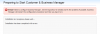
"Error: Failed to configure Business Manager. See the log below for details and fix the problems if possible. Business Manager will restart the configuration procedure next time you log in to it."
"Installation is in progress, please wait...
Installation has been completed with errors."
in C:\Windows\System32\drivers\etc\hosts
i have
"
10.0.0.13 sv1.tnd.vn
"
how can i fix it? Thank you
"Error: Failed to configure Business Manager. See the log below for details and fix the problems if possible. Business Manager will restart the configuration procedure next time you log in to it."
"Installation is in progress, please wait...
Installation has been completed with errors."
in C:\Windows\System32\drivers\etc\hosts
i have
"
10.0.0.13 sv1.tnd.vn
"
how can i fix it? Thank you