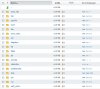
S SilentWarrior Basic Pleskian Oct 15, 2012 #1 Hi, is it possible to change the directories which are created if I create a new customer ? Normaly I get the directories in the picture for the custumer. I just found a Template where I can change the directories manly for the webpages. Thanks Attachments directory.jpg 89.5 KB · Views: 10
Hi, is it possible to change the directories which are created if I create a new customer ? Normaly I get the directories in the picture for the custumer. I just found a Template where I can change the directories manly for the webpages. Thanks
D DaveKay Regular Pleskian Oct 15, 2012 #2 If I understand you correctly, you can edit the virtual host template in "Tools & Settings > Virtual Host Template". These files are created in the httpdocs folder of the new hosting package. These default files are stored in /var/www/vhosts/.skel/ Using an app like WinSCP, you can directly edit these files rather than uploading an archive. Not sure if you'd want to edit / remove any of the other folders created when adding a new subscription. They are needed by the server. You can hide these root owned folders under your customers FTP login if you don't want them to see the folders. http://forum.parallels.com/showthread.php?t=53943 Hope this helps. Dave Last edited: Oct 15, 2012
If I understand you correctly, you can edit the virtual host template in "Tools & Settings > Virtual Host Template". These files are created in the httpdocs folder of the new hosting package. These default files are stored in /var/www/vhosts/.skel/ Using an app like WinSCP, you can directly edit these files rather than uploading an archive. Not sure if you'd want to edit / remove any of the other folders created when adding a new subscription. They are needed by the server. You can hide these root owned folders under your customers FTP login if you don't want them to see the folders. http://forum.parallels.com/showthread.php?t=53943 Hope this helps. Dave
S SilentWarrior Basic Pleskian Oct 15, 2012 #3 Hi Dave, that was what I looking for. Is it possible to do the same with the File Manager included in the panel ? Thanks
Hi Dave, that was what I looking for. Is it possible to do the same with the File Manager included in the panel ? Thanks
D DaveKay Regular Pleskian Oct 15, 2012 #4 Hi, Unfortunately not. This has been discussed a number of times so hopefully this will be something that is developed in future MU. Happy to help! Dave
Hi, Unfortunately not. This has been discussed a number of times so hopefully this will be something that is developed in future MU. Happy to help! Dave
S SilentWarrior Basic Pleskian Oct 16, 2012 #5 Hi, thank you. Hopefully that will be possible in the near future. Greetz