• Debian 11 is approaching its end-of-life (vendor EOL date - August 31, 2026). Plesk Obsidian 18.0.80 will be the last release to support it.
    If you are running Plesk Obsidian on Debian 11, we recommend you upgrade those servers to Debian 12 using our dist-upgrade tool.
  • We plan to deprecate and remove the support for XML RPC protocol versions earlier than 1.6.9.1 in Plesk Obsidian 18.0.82. We strongly recommend that you update all existing integrations using earlier versions of the XML RPC protocol to comply with the version 1.6.9.1 specification.

Disable wp-cron

wwwAndries

New Pleskian
When you disable the wp-cron in the wp-toolkit, there is also a scheduled task generated to execute the system cron. Is it possible to disable the automatic creation of this task?
I've my own system cron running and don't need/want these tasks.

What does this variable do: 'useShiftCronUpdateTask'?
 
There is no option to disable the cron completely via WordPress Toolkit. When disabling wp-cron, toolkit creates a scheduled task to cover scheduled activities on a website. If you will remove the scheduled task, it will be re-created automatically.
 
Actually, you can try to turn off maintenance activities that re-create a scheduled task:

[ext-wp-toolkit]
wpCronDisablingMaintenance = true

But anyway, you will need to remove an automatically created task first.
 
There is no option to disable the cron completely via WordPress Toolkit. When disabling wp-cron, toolkit creates a scheduled task to cover scheduled activities on a website. If you will remove the scheduled task, it will be re-created automatically.
Yes, I know, but I don't the toolkit re-created the task automatically. I disable the wp-cron default with the installation of WordPress and I've a wp-cli script that runs the cron for each site 2 times an hour without further configuration. This worked fine until the option to disable the wp-cron from within the wp-toolkit appeared.
 
> What does this variable do: 'useShiftCronUpdateTask'?
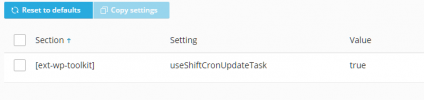
Could you please clarify, where did you see this option?
 
Actually, you can try to turn off maintenance activities that re-create a scheduled task:

[ext-wp-toolkit]
wpCronDisablingMaintenance = true

But anyway, you will need to remove an automatically created task first.
> What does this variable do: 'useShiftCronUpdateTask'?

Could you please clarify, where did you see this option?
Panel.ini

[ext-wp-toolkit]useShiftCronUpdateTasktrue
 
You can completely disable the feature:

[ext-wp-toolkit]
wpCronDisablingAllowed = false

In this case, wp-cron management control will disappear in the user interface.
 
I do not see an option 'useShiftCronUpdateTask' in WordPress Toolkit configuration. It seems like the documentation is a bit outdated. Could you please give me a link on the document where it's present?
 
This doesn't work, cronjobs are still recreated.
[ext-wp-toolkit]
wpCronDisablingMaintenance = true


Disabling or re-schedudling (i.e. once a year) the cronjobs doesn't work either, wp-toolkit will enable the jobs again or create a new one. Sometimes even multiple cronjobs for one site. I've a subscription with 3 sites/domains and there are 10 jobs created!
 
This is really weird. I would like to suggest to create a support ticket for investigation directly on your server.
 
Back
Top