• Debian 11 is approaching its end-of-life (vendor EOL date - August 31, 2026). Plesk Obsidian 18.0.80 will be the last release to support it.
    If you are running Plesk Obsidian on Debian 11, we recommend you upgrade those servers to Debian 12 using our dist-upgrade tool.
  • We plan to deprecate and remove the support for XML RPC protocol versions earlier than 1.6.9.1 in Plesk Obsidian 18.0.82. We strongly recommend that you update all existing integrations using earlier versions of the XML RPC protocol to comply with the version 1.6.9.1 specification.

Resolved Dkim tooltip missing details

jimmyh4

New Pleskian
Hello,

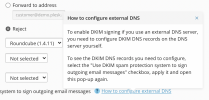
Looking for help at fixing the DKIM tooltip on the "How to configure external DNS" link.

Regards
 
Do you mean this tooltip?
Screenshot.png
Have you tried to clear the cache of your browser? Have you tried to reproduce it on another browser?
 
Do you mean this tooltip?
View attachment 19735
Have you tried to clear the cache of your browser? Have you tried to reproduce it on another browser?
firstly, thx for your response.

That is what is looks like on my end, i haven't tried that, i could try incognito mode, that would be very easy...

Considering i've been messing about and i'm a little out of practice, i'm thinking it technical or bug.

technical might be the kernel checking the thread verse the folder permission as i tried to install opendkim and reuse the domainkeys folder. I'm in the process right now at reverting to original using vbox and a trial version of plesk..... cant find the file structure or domainkeys permissions anywhere else :(

regards!
 
Back
Top