• Debian 11 has reached its end-of-life (vendor EOL date - August 31, 2026). Plesk Obsidian 18.0.81 is the last release to support it.
    If you are running Plesk Obsidian on Debian 11, we recommend you upgrade those servers to Debian 12 using our dist-upgrade tool.
  • We plan to deprecate and remove the support for XML RPC protocol versions earlier than 1.6.9.1 in Plesk Obsidian 18.0.82. We strongly recommend that you update all existing integrations using earlier versions of the XML RPC protocol to comply with the version 1.6.9.1 specification.

Issue dr.web running but no log file / users

JeffreyZ

Basic Pleskian
It seems dr.web is not working although it is running. I am no longer receiving email notifications that it has detected a virus, and there is no log file.

I purchased a licence recently and installed the key. The email accounts have been set up to check incoming messages. No log file at this location: /var/drweb/log/drwebd.log.

The file /etc/drweb/users.conf is empty.
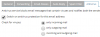
 

Attachments

  • antivirus panel.png
    antivirus panel.png
    10.8 KB · Views: 4
Is there any mentions about drweb triggering in /usr/local/psa/var/log/maillog?
 
Yes. I see that incoming mail is checked by drweb in the maillog. For example:

"scan: the message(drweb.tmp.B4D1pH) sent by [email protected] is passed
PASS during call 'drweb' handler"

So it seems it IS working, but not generating a log file, and not sending email notifications.
 
could the reason i'm not getting dr.web emails be a missing address in the drweb.ini file? There's nothing after" MailTo =". If so, do I just add an email address like "MailTo = [email protected]"?

# MailTo = {String}
# Administrator email address
MailTo =
 
Yes, you can configure DrWeb as you want with corresponding config files in /etc/drweb/ directory.
 
Back
Top