Follow along with the video below to see how to install our site as a web app on your home screen.
Note: This feature may not be available in some browsers.
The APS Catalog has been deprecated and removed from all Plesk Obsidian versions. Applications already installed from the APS Catalog will continue working. However, Plesk will no longer provide support for APS applications.
Please be aware: with the Plesk Obsidian 18.0.78 release, the support for the ngx_pagespeed.so module will be deprecated and removed from the sw-nginx package.
Yes , i try Repair Kit and also try by ( plesk repair all -y ) and ( plesk repair installation ) and ( "%plesk_bin64%"\websrvmng.exe --configure-plesk-website ) in CMD and Repair by ( Plesk Reconfigurator ) but error is strong
Check that file %plesk_dir%\admin\db\defpackagemng.xml is absent or corrupted. Move the file to another location if it is present.
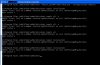
Run the following command in the command prompt to regenerate the defpackagemng.xml file:
Check that file %plesk_dir%\admin\db\defpackagemng.xml is absent or corrupted. Move the file to another location if it is present.
Run the following command in the command prompt to regenerate the defpackagemng.xml file: My AARP Medicare