• The APS Catalog has been deprecated and removed from all Plesk Obsidian versions.
    Applications already installed from the APS Catalog will continue working. However, Plesk will no longer provide support for APS applications.
  • Please be aware: with the Plesk Obsidian 18.0.78 release, the support for the ngx_pagespeed.so module will be deprecated and removed from the sw-nginx package.

Issue File Sharing issue

loopb

New Pleskian
Hello,
just install Onyx.

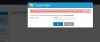
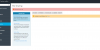
On File Sharing I am getting Internal error: OK; Unable to load folders list. - as on attached screenshot.
My system config is

OS: ‪Debian 8.6‬
Product: Plesk Onyx 17.0.17 Update #10 , last updated at Dec 11, 2016 04:46 PM
PHP version: 5.6.29 + FastCGI

While creating folder: Unable to create the folder: internal WebDAV service error. Error code: 404.

Where I can search for any log file?
 

Attachments

  • plesk_issue.png
    plesk_issue.png
    44.3 KB · Views: 7
  • plesk_issue2.png
    plesk_issue2.png
    21.3 KB · Views: 7
Do you have any related errors in /var/www/vhosts/domain.com/logs/error_log ?

Also try to run

# /usr/local/psa/admin/sbin/file-sharing --sync
 
Hello,
I have check logs and there is no log related.
I have also run --sync without success.

Any idea where I can search or how to depp investigate it?

What is saying this UI message: Internal error: OK

Update 1:
++++++++++++++++++++++++++

The issue: when option: "Permanent SEO-safe 301 redirect from HTTP to HTTPS" was selected for my domain I was getting those messages.
After unselecting it file sharing starts to work.

Update2:
++++++++++++++++++++++++++
I select once more (enabled) Permanent SEO-safe 301 redirect from HTTP to HTTPS and it works - no idea why.
I have also swith all domains to FPM Apache and file sharing is still working - any clue why?
 
Last edited:
Back
Top