• Inviting everyone who uses WordPress management tools in Plesk
    The Plesk team is conducting a 60-minute research session that includes an interview and a moderated usability test.
    To participate, please use this link .
    Your experience will help shape product decisions and ensure the tools better support real-world use cases.

Issue File Sharing issue

loopb

New Pleskian
Hello,
just install Onyx.

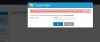
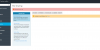
On File Sharing I am getting Internal error: OK; Unable to load folders list. - as on attached screenshot.
My system config is

OS: ‪Debian 8.6‬
Product: Plesk Onyx 17.0.17 Update #10 , last updated at Dec 11, 2016 04:46 PM
PHP version: 5.6.29 + FastCGI

While creating folder: Unable to create the folder: internal WebDAV service error. Error code: 404.

Where I can search for any log file?
 

Attachments

  • plesk_issue.png
    plesk_issue.png
    44.3 KB · Views: 7
  • plesk_issue2.png
    plesk_issue2.png
    21.3 KB · Views: 7
Do you have any related errors in /var/www/vhosts/domain.com/logs/error_log ?

Also try to run

# /usr/local/psa/admin/sbin/file-sharing --sync
 
Hello,
I have check logs and there is no log related.
I have also run --sync without success.

Any idea where I can search or how to depp investigate it?

What is saying this UI message: Internal error: OK

Update 1:
++++++++++++++++++++++++++

The issue: when option: "Permanent SEO-safe 301 redirect from HTTP to HTTPS" was selected for my domain I was getting those messages.
After unselecting it file sharing starts to work.

Update2:
++++++++++++++++++++++++++
I select once more (enabled) Permanent SEO-safe 301 redirect from HTTP to HTTPS and it works - no idea why.
I have also swith all domains to FPM Apache and file sharing is still working - any clue why?
 
Last edited:
Back
Top