• We value your experience with Plesk during 2025
    Plesk strives to perform even better in 2026. To help us improve further, please answer a few questions about your experience with Plesk Obsidian 2025.
    Please take this short survey:

    https://survey.webpros.com/

Resolved Firewall endless loop

UHolthausen

Regular Pleskian
Server operating system version
Debian 10
Plesk version and microupdate number
Plesk Obsidian Version 18.0.54 Update #2,
Hello
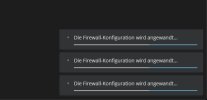
I changed something in the firewall, saved and agreed to the changes.
confirm timeout is 40

even after a restart it is still there, see screenshot
 

Attachments

  • endless loop.jpg
    endless loop.jpg
    42.7 KB · Views: 7
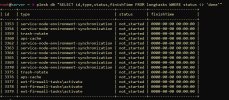
Do you mean changing the status information in the longtasks table? That won't do anything, instead you need to remove the datasets. That table only helps the software to determine whether a dialog should be shown on the GUI or not. It does not start or stop services.

There have been a number of issues with the new Firewall Extension. But unfortunately I was never able to reproduce them either on test instances here or in a production environment, so I can only refer you to the standard solutions, e.g. extending the configuration wait period. With your symptom though I can only recommend to present this to support staff so that it can be examined and a solution provided by support.
 
Hello Peter
unfortunately no process is running.
Firewall according to panel is active.
Is it possible that the problem is more likely to be found in the plesk panel?
 

Attachments

  • tasks.jpg
    tasks.jpg
    418.8 KB · Views: 1
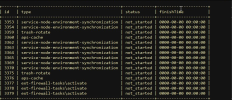
Your screenshot shows three firewall entries in the longtasks table. You need to remove these three datasets. These are the three datasets that cause the dialog display on your GUI.
 
Hello Peter

sorry, that it tooks a while.
I has worked, its gone. Bookmarked this page for the next time

Thanks for the kind help
 
Back
Top