Facebook
 Twitter
Lucius0101
New Pleskian
Hello! I'm new to the forum, so maybe that's a newbie question.
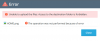
I am trying to set up File Sharing, however when uploading a file, the error message appears: "Unable to upload the files: Access to the destination folder is forbidden".
When looking for possible solutions, I found this link, so I decided to create a new subdomain with nothing inside, and configure File Sharing on it, but also without success.
Can help me please?
I am trying to set up File Sharing, however when uploading a file, the error message appears: "Unable to upload the files: Access to the destination folder is forbidden".
When looking for possible solutions, I found this link, so I decided to create a new subdomain with nothing inside, and configure File Sharing on it, but also without success.
- OS: Ubuntu 18.04.4 LTS
- Product: Plesk Obsidian 18.0.25
Can help me please?