
 Facebook
 Twitter
Hello me again!
I have plesk 18.0.41 Update Nr. 1.
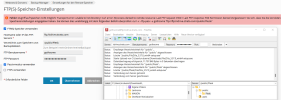
I want to set up an external FTP Stprage for the Backups, but it cant connect:
Ii is an rented space in which you cant put ans Files in the root directory.
I can connect with Filezilla and drop files at /public and the created folder /public/Plesk.
When i connect with the Storage via cli i can connect, but not navigate in the folders with the correct permissions - then there ist the Error 550 again.
I tried every combination of the Checkboxes (SFTP Target at Sftp.hidrive....)
Thank you again for your Help!
I have plesk 18.0.41 Update Nr. 1.
I want to set up an external FTP Stprage for the Backups, but it cant connect:
Code:
Transport error: unable to list directory: Curl error: (9) Access denied to remote resource: Last FTP request: CWD / Last FTP response: 550 Permission deniedIi is an rented space in which you cant put ans Files in the root directory.
I can connect with Filezilla and drop files at /public and the created folder /public/Plesk.
When i connect with the Storage via cli i can connect, but not navigate in the folders with the correct permissions - then there ist the Error 550 again.
I tried every combination of the Checkboxes (SFTP Target at Sftp.hidrive....)
Thank you again for your Help!

