Facebook
 Twitter
agencyblue
New Pleskian
- Server operating system version
- Ubuntu 20.04.4 LTS
- Plesk version and microupdate number
- Plesk Obsidian v18.0.38_build1800211001.19 os_Ubuntu 20.04
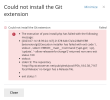
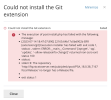
I tried installing the Git extension (Git), but it returned the following error: "Could not install the Git extension".
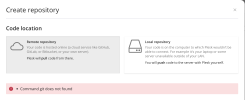
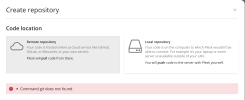
The extension does show up in the menu, but when I try to add a remote repository (Github via the SSH protocol) it returns the error: "Command git does not found".
I've searched for these specific errors, but nothing related showed up unfortunately.
Software:
- The execution of post-install.php has failed with the following message:
- [2023-07-14 18:47:07.890] 22165:64b17c0bd902b ERR [extension/git] Execution installer has failed with exit code 1, stdout: , stderr: ERROR:__main__:Command '['apt-get', '-qq', 'update', '--allow-releaseinfo-change']' returned non-zero exit status 100
- stdout:
- stderr:E: The repository 'http://ftp.stratoserver.net/pub/plesk/pool/PSA_18.0.38_7167 focal Release' no longer has a Release file.
- exit status 1
The extension does show up in the menu, but when I try to add a remote repository (Github via the SSH protocol) it returns the error: "Command git does not found".
I've searched for these specific errors, but nothing related showed up unfortunately.
Software:
| Version | Plesk Obsidian v18.0.38_build1800211001.19 os_Ubuntu 20.04 |
| OS | Ubuntu 20.04.4 LTS |