• Debian 11 has reached its end-of-life (vendor EOL date - August 31, 2026). Plesk Obsidian 18.0.81 is the last release to support it.
    If you are running Plesk Obsidian on Debian 11, we recommend you upgrade those servers to Debian 12 using our dist-upgrade tool.
  • We plan to deprecate and remove the support for XML RPC protocol versions earlier than 1.6.9.1 in Plesk Obsidian 18.0.82. We strongly recommend that you update all existing integrations using earlier versions of the XML RPC protocol to comply with the version 1.6.9.1 specification.

How reactivate email service after Outgoing limit reached

Sebastien Bergeron

New Pleskian
A customer reached his outgoing limit. I've explain it to him so he can prevent mass mailing in the future but now the Mail Status stay at Not sending. How can I allow mail sending again?

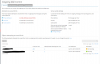
Name Limit per Hour Attempts after Reaching the Limit Last Attempt Mail Status
[email protected] 250 4 April 25, 2016 03:00 PM
att.png
Not Sending
 
By default, there is 1-hour delay after reaching limit.
Must probably that user continues to send emails, and therefore continues to be blocked.
Check it here Tools & Settings > Outgoing Mail Control
 
I'm trying to find a way to re-enable a user's outgoing email account as well.
After the user has found malware and cleaned it up, is there no way to instantly get their account working again?
Is there a way to manually reset the count of outgoing emails back to zero?
 
Back
Top