• Inviting everyone who uses WordPress management tools in Plesk
    The Plesk team is conducting a 60-minute research session that includes an interview and a moderated usability test.
    To participate, please use this link .
    Your experience will help shape product decisions and ensure the tools better support real-world use cases.

Question How to disable the Whois Information option in Customer panel?

Thomas Oryon

Basic Pleskian
Server operating system version
Redhat Linux 9
Plesk version and microupdate number
18.0.76
Hello,

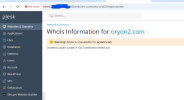
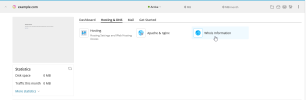
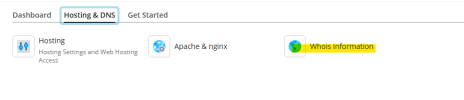
We want to know how to disable/hide the Whois Information option in Plesk customer panel? We have already disabled the DNS in this server but how to hide this? Refer to the attached.

If there is any way to hide this option, please share the steps.

Awaiting your reply.
 

Attachments

  • Screenshot 2026-03-20 122435.png
    Screenshot 2026-03-20 122435.png
    15.8 KB · Views: 6
Interesting. That is a Plesk feature, but I can't get the button to show on my install.

Do you have anything in /admin/custom-buttons/list (Plesk > Tools&Settings > Plesk Appearance: Custom Buttons)?
 
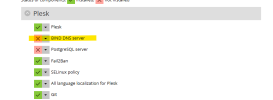
Ah. Indeed. Thank you, @Kaspar. With "BIND DNS server" removed from
Bash:
plesk installer
the Whois button is displayed.
1774021549817.png
Without the "BIND DNS server" component installed, you don't have access to
Bash:
plesk bin subscription_settings --update example.com -manage_dns false

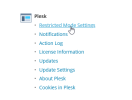
You can install the "BIND DNS server" and deactivate "DNS zone management" in the subscription permissions (for the Plesk user) and in Tools & Settings > Restricted view (for Plesk admin).
 
Back
Top