• The APS Catalog has been deprecated and removed from all Plesk Obsidian versions.
    Applications already installed from the APS Catalog will continue working. However, Plesk will no longer provide support for APS applications.
  • Please be aware: with the Plesk Obsidian 18.0.78 release, the support for the ngx_pagespeed.so module will be deprecated and removed from the sw-nginx package.

Question How to disable the Whois Information option in Customer panel?

Thomas Oryon

Regular Pleskian
Server operating system version
Redhat Linux 9
Plesk version and microupdate number
18.0.76
Hello,

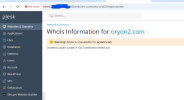
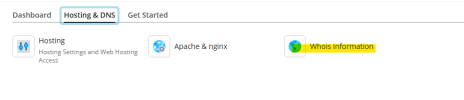
We want to know how to disable/hide the Whois Information option in Plesk customer panel? We have already disabled the DNS in this server but how to hide this? Refer to the attached.

If there is any way to hide this option, please share the steps.

Awaiting your reply.
 

Attachments

  • Screenshot 2026-03-20 122435.png
    Screenshot 2026-03-20 122435.png
    15.8 KB · Views: 11
Hello Raul,

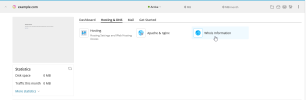
Are you referring to the below screenshot?

Awaiting you reply.
 

Attachments

  • Doman name.png
    Doman name.png
    61.2 KB · Views: 11
Interesting. That is a Plesk feature, but I can't get the button to show on my install.

Do you have anything in /admin/custom-buttons/list (Plesk > Tools&Settings > Plesk Appearance: Custom Buttons)?
 
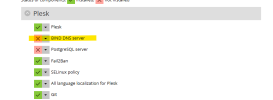
Ah. Indeed. Thank you, @Kaspar. With "BIND DNS server" removed from
Bash:
plesk installer
the Whois button is displayed.
1774021549817.png
Without the "BIND DNS server" component installed, you don't have access to
Bash:
plesk bin subscription_settings --update example.com -manage_dns false

You can install the "BIND DNS server" and deactivate "DNS zone management" in the subscription permissions (for the Plesk user) and in Tools & Settings > Restricted view (for Plesk admin).
 
Hello,

Thanks for the detailed explanation. Yes, the BIND DNS server was not installed and it was not required for me. Should I need to install this again and make changes in the subscription permission?

Awaiting your reply
 

Attachments

  • Bind.png
    Bind.png
    12.9 KB · Views: 4
Yes, you should install it.

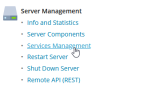
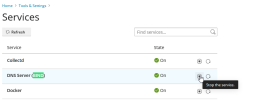
If the DNS service is not needed, you can simplify stop it, from Tools & Settings > Services.

How do your customers/users access Plesk? Plesk admin, Plesk customer/reseller or subscription user? What Plesk license do you currently have?
 
Hello Raul,

I have installed the BIND DNS Server and WHOIS was not displayed in customer portal as expected. But I can view the DNS settings under Tools & Settings which is not need to shown there. Since, I don't wish to manage the DNS option I have disabled this Bind DNS. Is there any option to achieve this goal?

Awaiting your reply.
 
Hello Thomas,

Can you share why you aren't using the Plesk control panel DNS service?

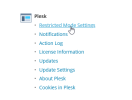
Plesk has Restricted Mode. You can use it to hide the DNS settings from admin and additional admin accounts. You enable all the options and deselect the Hosting Tools: DNS zone management option.
1774258781849.png

Don't forget to stop the BIND service
1774258616557.png 1774258640078.png
 
Hello Raul,

Just to confirm that if we click on WHOIS information, what information will it fetch from Internet?

Awaiting your reply.
 
Hi Thomas,

The WHOIS information is the publicly available information about the domain registration. Something like this:
$ whois plesk.com
Domain Name: PLESK.COM
Registry Domain ID: 7218527_DOMAIN_COM-VRSN
Registrar WHOIS Server: whois.eurodns.com
Registrar URL: http://www.eurodns.com
Updated Date: 2023-04-20T02:35:59Z
Creation Date: 1999-06-13T23:37:30Z
Registry Expiry Date: 2026-06-13T23:38:09Z
Registrar: EuroDNS S.A.
Registrar IANA ID: 1052
Registrar Abuse Contact Email: [email protected]
Registrar Abuse Contact Phone: +352.27220150
Domain Status: clientTransferProhibited EPP Status Codes | What Do They Mean, and Why Should I Know? - ICANN
Name Server: GENE.NS.CLOUDFLARE.COM
Name Server: JEFF.NS.CLOUDFLARE.COM
DNSSEC: unsigned
URL of the ICANN Whois Inaccuracy Complaint Form: Submitting a Complaint to ICANN Contractual Compliance - ICANN
>>> Last update of whois database: 2026-03-23T13:39:33Z <<<

I'm not sure why you had a connection timeout error. Is your firewall "System policy for outgoing traffic" set to deny? Was the same error displayed on all registered hosted websites that have registered domain names (oryon2.com is not registered)?
 
Back
Top