• The new Python extension is now available. It allows customers to deploy and manage WSGI-based Python applications on their websites directly from Plesk.
  • The Plesk Mobile apps for iOS and Android and the Plesk Mobile Center extension have been deprecated, and are no longer available for new installations. In Plesk Obsidian 18.0.84, the Plesk Mobile Center extension will be removed from servers during the upgrade, and the Plesk Mobile apps will lose their server management features.
  • The Social Login extension has been deprecated and will be removed in Plesk Obsidian 18.0.84. After that, it will no longer be possible to log in to Plesk with a Google, Facebook, GitHub account, or with a passkey. Plesk usernames and passwords, as well as logging in with a WebPros Account, are not affected.

hwo to fix SSL_ERROR_RX_RECORD_TOO_LONG

parahakoo

New Pleskian
I'm facing an issue only my pc I reinstall lets encrypt certificate again and again but I can't open on my pc or laptop but I can open in my office pc and network. ISP are different.
Please guide me ho can I fix this problem.
 
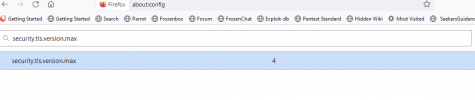
What is set in your Firefox configuration in the variable security.tls.version.max? (about:config, then search for security.tls.version.max)
What TLS versions does your server deliver? (# plesk sbin sslmng --show-config)
 
What is set in your Firefox configuration in the variable security.tls.version.max? (about:config, then search for security.tls.version.max)
What TLS versions does your server deliver? (# plesk sbin sslmng --show-config)
value set: 4
 

Attachments

  • dsd.PNG
    dsd.PNG
    11.4 KB · Views: 2
plesk sbin sslmng --show-config
output:

{
"full": {
"all": {
"dhparams_size": 2048,
"ciphers": "EECDH+AESGCM+AES128:EECDH+AESGCM+AES256:EECDH+CHACHA20:E DH+AESGCM+AES128:EDH+AESGCM+AES256:EDH+CHACHA20:EECDH+SHA256+AES128:EECDH+SHA384 +AES256:EDH+SHA256+AES128:EDH+SHA256+AES256:EECDH+SHA1+AES128:EECDH+SHA1+AES256: EDH+SHA1+AES128:EDH+SHA1+AES256:EECDH+HIGH:EDH+HIGH:AESGCM+AES128:AESGCM+AES256: CHACHA20:SHA256+AES128:SHA256+AES256:SHA1+AES128:SHA1+AES256:HIGH:!aNULL:!eNULL: !EXPORT:!DES:!RC4:!3DES:!MD5:!PSK:!KRB5:!aECDH:!kDH",
"strong_dh": true,
"protocols": [
"TLSv1.2",
"TLSv1.3"
],
"cipher_server_order": true
},
"dovecot": {
 

Attachments

  • plesk sbin.pdf
    65.4 KB · Views: 1
As both configurations seem to match there is some likelihood that your computer is infected with malware that is redirecting browser requests to a third-party.
 
Back
Top