Follow along with the video below to see how to install our site as a web app on your home screen.
Note: This feature may not be available in some browsers.
The APS Catalog has been deprecated and removed from all Plesk Obsidian versions. Applications already installed from the APS Catalog will continue working. However, Plesk will no longer provide support for APS applications.
Please be aware: with the Plesk Obsidian 18.0.78 release, the support for the ngx_pagespeed.so module will be deprecated and removed from the sw-nginx package.
I'm facing an issue only my pc I reinstall lets encrypt certificate again and again but I can't open on my pc or laptop but I can open in my office pc and network. ISP are different.
Please guide me ho can I fix this problem.
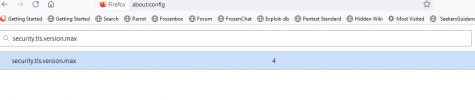
What is set in your Firefox configuration in the variable security.tls.version.max? (about:config, then search for security.tls.version.max)
What TLS versions does your server deliver? (# plesk sbin sslmng --show-config)
What is set in your Firefox configuration in the variable security.tls.version.max? (about:config, then search for security.tls.version.max)
What TLS versions does your server deliver? (# plesk sbin sslmng --show-config)
As both configurations seem to match there is some likelihood that your computer is infected with malware that is redirecting browser requests to a third-party.