Facebook
 Twitter
- Server operating system version
- Ubuntu
- Plesk version and microupdate number
- Obsidian 18.0.55
Good morning,
We purchased the Developer Pack in order to be able to manage MSSQL database servers.
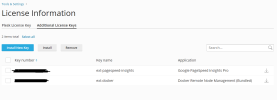
We followed the procedure, but it only added the keys for Docker and for PageSpeed Insight... nothing about MSSQL.
I don't see anywhere to add it or even configure it, is this normal?
(I followed the tutorial https://support.plesk.com/hc/en-us/...-not-possible-to-manage-MSSQL-server-in-Plesk)
Can you help me?
We purchased the Developer Pack in order to be able to manage MSSQL database servers.
We followed the procedure, but it only added the keys for Docker and for PageSpeed Insight... nothing about MSSQL.
I don't see anywhere to add it or even configure it, is this normal?
(I followed the tutorial https://support.plesk.com/hc/en-us/...-not-possible-to-manage-MSSQL-server-in-Plesk)
Can you help me?