• Halloween is coming! To celebrate the occasion, we dusted off a couple of old skins, and even created a brand new one (Pixel).
    To get into the festive spirit, install the Skins extension.
  • The new Python extension is now available. It allows customers to deploy and manage WSGI-based Python applications on their websites directly from Plesk.
  • The Plesk Mobile apps for iOS and Android and the Plesk Mobile Center extension have been deprecated, and are no longer available for new installations. In Plesk Obsidian 18.0.84, the Plesk Mobile Center extension will be removed from servers during the upgrade, and the Plesk Mobile apps will lose their server management features.
  • The Social Login extension has been deprecated and will be removed in Plesk Obsidian 18.0.84. After that, it will no longer be possible to log in to Plesk with a Google, Facebook, GitHub account, or with a passkey. Plesk usernames and passwords, as well as logging in with a WebPros Account, are not affected.

Resolved I cannot manage MSSQL even though we have a Developer Pack license

Korpin

New Pleskian
Server operating system version
Ubuntu
Plesk version and microupdate number
Obsidian 18.0.55
Good morning,

We purchased the Developer Pack in order to be able to manage MSSQL database servers.

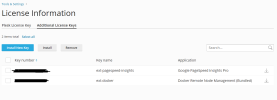
We followed the procedure, but it only added the keys for Docker and for PageSpeed Insight... nothing about MSSQL.

I don't see anywhere to add it or even configure it, is this normal?
(I followed the tutorial https://support.plesk.com/hc/en-us/...-not-possible-to-manage-MSSQL-server-in-Plesk)

Can you help me?
 

Attachments

  • developerPack.png
    developerPack.png
    39 KB · Views: 6
What happens if you install the Activation Key?
How can I install the Activation Key?

I tried to do 'Install New Key', then I enter the EXT.XXXXXXXX.XX but I receive 'The activation code is not valid.'
Where can I find the Activation Key?
 
1 - Log in on platform360.io
2 - Go to Licensing
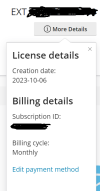
3 - Click on "More Details" to show the activation code

I'm sorry but I do not see the activation code on the screenshot here (I tried the Subscription ID but it looks like it's not this the activation code).
 

Attachments

  • ext.png
    ext.png
    22.6 KB · Views: 4
Back
Top