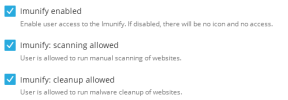
Resolved Imunify View and On-Demand-Scan unavailable for users

Bitpalast

Plesk addicted!
Plesk Guru
Server operating system version
Alma 8
Plesk version and microupdate number
18.0.78 #4
1783326267227.png

But: When the user logs in, he can neither see the latest scan results from the monthly automated scan done by admin (root), nor can he start an "on demand scan".

I think this was both possible before.

When I open the account with "Login as user" from the panel admin account, I can see the admin (root) scan results, but I cannot start an on-demand scan either.
 
Hi, Peter. Judging by the settings it does make sense for the users to be able to perform the corresponding actions. I forwarded the inquiry to the CloudLinux team, because I am not sure either. Just in case they ask, can you please confirm if you use ImunifyAV+ or Imunify360?
 
Thanks. They want you to check if this option is enabled:

Code:
imunify-antivirus config show --json | jq | grep "PERMISSIONS" -A 10

We are looking for: "use_plesk_service_plan": false,

If it is disabled, please enable it with:

Code:
imunify-antivirus config update '{"PERMISSIONS": {"use_plesk_service_plan": true}}'
 
# imunify-antivirus config show --json | jq | grep "PERMISSIONS" -A 10
Code:
    "PERMISSIONS": {
      "support_form": true,
      "advisor": true,
      "user_ignore_list": true,
      "upgrade_button": true,
      "allow_malware_scan": false,
      "user_override_malware_actions": false,
      "user_override_proactive_defense": false,
      "allow_local_malware_ignore_list_management": true,
      "use_plesk_service_plan": false
    },

# imunify-antivirus config update '{"PERMISSIONS": {"use_plesk_service_plan": true}}'
Code:
{'ADMIN_CONTACTS': {'emails': [], 'enable_icontact_notifications': True}, 'BACKUP_RESTORE': {'cl_backup_allowed': True, 'cl_on_premise_backup_allowed': False, 'max_days_in_backup': 90}, 'CONTROL_PANEL': {'generic_user_notifications': True}, 'DASHBOARD': {'notifications': {'aibolit_vulnerable': True, 'insecure_wp_core': True, 'malicious_redirect_detected': True, 'malware_detected': True, 'malware_found': True, 'outdated_wp_core': True, 'scan_not_scheduled': True}}, 'ERROR_REPORTING': {'enable': True}, 'LOGGER': {'backup_count': 5, 'max_log_file_size': 62914560, 'syscall_monitor': True}, 'MALWARE_CLEANUP': {'keep_original_files_days': 7, 'trim_file_instead_of_removal': False}, 'MALWARE_DATABASE_SCAN': {'db_timeout': 15, 'enable': True}, 'MALWARE_SCANNING': {'cloud_assisted_scan': True, 'crontabs': True, 'default_action': 'cleanup', 'detect_admin_tools': True, 'detect_elf': True, 'enable_scan_cpanel': True, 'enable_scan_inotify': True, 'enable_scan_modsec': True, 'enable_scan_pure_ftpd': True, 'hyperscan': True, 'max_cloudscan_size_to_scan': 104857600, 'max_mrs_upload_file': 104857600, 'max_path_len': 4096, 'max_signature_size_to_scan': 1048576, 'max_targets_per_scan_type': 100000, 'notify_on_detect': False, 'optimize_realtime_scan': True, 'rapid_scan': True, 'rapid_scan_rescan_unchanging_files_frequency': None, 'scan_modified_files': None, 'sends_file_for_analysis': False, 'try_restore_from_backup_first': False}, 'MALWARE_SCAN_INTENSITY': {'cpu': 2, 'io': 2, 'ram': 2048, 'resident_ram': 2048, 'user_scan_cpu': 2, 'user_scan_io': 2, 'user_scan_ram': 1024}, 'MALWARE_SCAN_SCHEDULE': {'day_of_month': 25, 'day_of_week': 0, 'hour': 6, 'interval': 'month'}, 'MOD_SEC_BLOCK_BY_CUSTOM_RULE': {'33339': {'check_period': 120, 'max_incidents': 10}}, 'MY_IMUNIFY': {'enable': False, 'purchase_page_url': 'https://{{ your billing system host }}:?{{ port }}/'}, 'PAM': {'exim_dovecot_native': True}, 'PATCHMAN': {'enable': False}, 'PERMISSIONS': {'advisor': True, 'allow_local_malware_ignore_list_management': True, 'allow_malware_scan': False, 'support_form': True, 'upgrade_button': True, 'use_plesk_service_plan': True, 'user_ignore_list': True, 'user_override_malware_actions': False, 'user_override_proactive_defense': False}, 'PROACTIVE_DEFENCE': {'php_immunity': True}, 'RESOURCE_MANAGEMENT': {'cpu_limit': 2, 'io_limit': 2, 'ram_limit': 500}, 'SEND_ADDITIONAL_DATA': {'enable': True}, 'WEBSHIELD': {'splash_screen': True}, 'WORDPRESS': {'ai_bot_protection': False, 'ai_bot_protection_preset': 'balanced', 'security_plugin_enabled': False, 'waf_default': False, 'waf_enabled': True}}

# imunify-antivirus config show --json | jq | grep "PERMISSIONS" -A 10
Code:
    "PERMISSIONS": {
      "advisor": true,
      "allow_local_malware_ignore_list_management": true,
      "allow_malware_scan": false,
      "support_form": true,
      "upgrade_button": true,
      "use_plesk_service_plan": true,
      "user_ignore_list": true,
      "user_override_malware_actions": false,
      "user_override_proactive_defense": false
    },

Seems to yield success!
 
Still a bug though, because on none of the servers here - from ancient to brand new - "use_plesk_service_plan" is "true". I'll update all of them shortly.
 
Glad to hear it worked. According to what they told me, this is not a bug, rather a configurable setting.
 
Yes, it's a configuration. But: When the user sees the checkboxes in a Plesk service plan, but those checkboxes have no effect, how should the user know that he has to activate the option with a command line command in Imunify? Would it not be much better if Plesk checked whether that option is already activated and activate it for the user when any of the checkboxes in the service plan are checked?
 
I thought the same thing, but when I brought the subject of a potential bug, based on their explanation that's additional configuration that needs to be applied. I will double-check with them again.
 
Peter, the Imunify team asked for i360deploy.log from /var/log? Could you please share it if you don't mind? Thanks in advance.
 
No such log found. Instead:
Code:
-rw-------.  1 root              root                92410 Jan 24  2025 imav-deploy.log
drwx------.  2 root              root                 4096 Jul 10 04:26 imunify360
drwxrwxrwt.  2 root              root                 4096 Jun 16 12:45 imunify360_user_logs
-rw-r--r--.  1 root              root               441768 Jul  8 04:01 imunify-agent-proxy.log
Which one of these is requested? the imav-deploy.log maybe? I'll send that via PM.
 
Back
Top