Follow along with the video below to see how to install our site as a web app on your home screen.
Note: This feature may not be available in some browsers.
Halloween is coming! To celebrate the occasion, we dusted off a couple of old skins, and even created a brand new one (Pixel).
To get into the festive spirit, install the Skins extension.
The new Python extension is now available. It allows customers to deploy and manage WSGI-based Python applications on their websites directly from Plesk.
The Plesk Mobile apps for iOS and Android and the Plesk Mobile Center extension have been deprecated, and are no longer available for new installations. In Plesk Obsidian 18.0.84, the Plesk Mobile Center extension will be removed from servers during the upgrade, and the Plesk Mobile apps will lose their server management features.
The Social Login extension has been deprecated and will be removed in Plesk Obsidian 18.0.84. After that, it will no longer be possible to log in to Plesk with a Google, Facebook, GitHub account, or with a passkey. Plesk usernames and passwords, as well as logging in with a WebPros Account, are not affected.
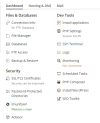
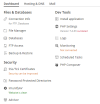
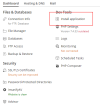
@LuBre Also on Dynamic List, please click on "Install Applications", then choose "Git" from the drawer and add it. I think the designer's idea was to not to overload the page with unnecessary icons but let users add the icons through the "Install" button.
Got it. Weird but... It works, yes. I hope the icon will be added back where it was. I mean, it's way more useful than having stuff lik ImmunifyAV or Advisor, after all.
At the very least it would be nice if we could decide which applications are 'default' somewhere. When I click Install Applications I only have a choice between Git and Node.js, both of which are far more useful to us than PHP Composer, Docker, Speed Kit, etc. If the designers's idea was to reduce the number of icons and simplify the presentation then it would seem to make sense to let the user select which ones to show.
True, the new feature seems to override the Service Plan settings. When I disable access to the Laravel Toolkit and Git, it still shows those options when I choose "Install Application". The WordPress Toolkit is completely missing on the "Install Application" sidebar. I'm not sure how this was intended to work.
At the very least it would be nice if we could decide which applications are 'default' somewhere. When I click Install Applications I only have a choice between Git and Node.js, both of which are far more useful to us than PHP Composer, Docker, Speed Kit, etc. If the designers's idea was to reduce the number of icons and simplify the presentation then it would seem to make sense to let the user select which ones to show.