• Debian 11 has reached its end-of-life (vendor EOL date - August 31, 2026). Plesk Obsidian 18.0.81 is the last release to support it.
    If you are running Plesk Obsidian on Debian 11, we recommend you upgrade those servers to Debian 12 using our dist-upgrade tool.
  • We plan to deprecate and remove the support for XML RPC protocol versions earlier than 1.6.9.1 in Plesk Obsidian 18.0.82. We strongly recommend that you update all existing integrations using earlier versions of the XML RPC protocol to comply with the version 1.6.9.1 specification.

Question lets encrypt

you have dedicated ip much better,
you generate sinces on the categories then copy the key and crt on attribut ip too.
 
mmm I have dedicated ip but I have not understanded the rest, when I look into ssl certificates it is supposed to be installed
 
i did screenshot for more help you, how do?
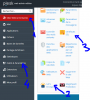
LETencryptssl1.PNG
LETencryptssl1.PNG
1: website & domain name
2: click and generate new leftencryp
3: click to copy all neccessaries need
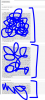
LETencryptssl2.PNG Copy all that and past for the trial images on step 2
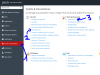
LETencryptssl3.PNG

1: pararameter
2 SSL certificat (past key, crt et ca-crt)
3: attribut the dedicated domaine name

Only solution for plesk works late that!, nice to help you and nice days (sorry the panel is french).
 
Back
Top