• The APS Catalog has been deprecated and removed from all Plesk Obsidian versions.
    Applications already installed from the APS Catalog will continue working. However, Plesk will no longer provide support for APS applications.
  • Please be aware: with the Plesk Obsidian 18.0.78 release, the support for the ngx_pagespeed.so module will be deprecated and removed from the sw-nginx package.

Question lets encrypt

you have dedicated ip much better,
you generate sinces on the categories then copy the key and crt on attribut ip too.
 
mmm I have dedicated ip but I have not understanded the rest, when I look into ssl certificates it is supposed to be installed
 
i did screenshot for more help you, how do?
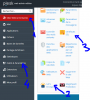
LETencryptssl1.PNG
LETencryptssl1.PNG
1: website & domain name
2: click and generate new leftencryp
3: click to copy all neccessaries need
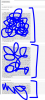
LETencryptssl2.PNG Copy all that and past for the trial images on step 2
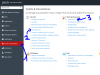
LETencryptssl3.PNG

1: pararameter
2 SSL certificat (past key, crt et ca-crt)
3: attribut the dedicated domaine name

Only solution for plesk works late that!, nice to help you and nice days (sorry the panel is french).
 
Back
Top