Follow along with the video below to see how to install our site as a web app on your home screen.
Note: This feature may not be available in some browsers.
The APS Catalog has been deprecated and removed from all Plesk Obsidian versions. Applications already installed from the APS Catalog will continue working. However, Plesk will no longer provide support for APS applications.
Please be aware: with the Plesk Obsidian 18.0.78 release, the support for the ngx_pagespeed.so module will be deprecated and removed from the sw-nginx package.
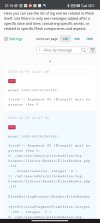
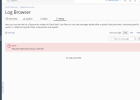
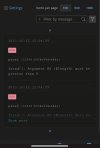
The error messages shown let me suspect that the log browser tries to display empty files. I was not able to reproduce this on a test server with Ubuntu. Maybe you can remember what was done on the system before that an unusual, unplanned situation with log files could occur?
I didn't take screenshot but before was error of loading log.. Can't remember just was setting up plesk. It never repeated. I guess I leave open log browser open and did hosting backup restore. So it try access not existing data.. Idk.
What are the actual steps to reliably reproduce the situation? You say you reinstalled the server, but after reinstallation you did something else. Can the issue be reliably reproduced by doing a fresh Plesk install only?
cut this one from server in ssh: sudo systemctl disable systemd-networkd-wait-online.service && sudo systemctl mask systemd-networkd-wait-online.service
in plesk:
Security Policy - password Very strong
Session Settings - idle time to 60min
Server Settings - domain.tld
System Time - Lithuania
PHP Settings - 8,2,11 php memmory limit to 512mb, upload/post 64mb , max vars 3000
Customize Plesk URL - o custom URLs. Only https://<server-IP-or-hostname>:8443
Server-wide mail settings - Enable SMTP service on port 587 on all IP addresses
Log browser - Plesk <-
Uodate: Ubuntu 20 į get no error. But maybe it becouse now panel throw error for lets Encrypt. I already reached limit of issuing sertificate. So log is not Empty and 500 error not show.
It does say "no logs provided", though. So it seems to be a matter of interpretation or a cosmetic issue that the error 500 message should be hidden, if no log entries exist?
Yes sure it is one time issue only after panel install, then log filling with data and no such error happen. . Yes Cosmetic. But Plesk is not cheap panel compared to free ones. So no cosmetic issues must be. Right?
This is when clear log with
echo "" > panel.log
Command
Developers could not reproduce the issue and have also shown that the code of the latest version covers the rare case of an empty or non-existent log. We suggest to verify that you are using the latest Plesk version, specifically as your previous posts have also shown a large number of "issues" that we could not reproduce here.
Could you please open a support ticket. Just as with the other cases you reported as we cannot reproduce it in our test environment here, it will be necessary that staff checks it directly on your system.