Facebook
 Twitter

Quinten
Regular Pleskian
- Server operating system version
- Ubuntu 24.04 x86_64
- Plesk version and microupdate number
- Plesk Obsidian 18.0.82.3
Server operating system version: Ubuntu 24.04 x86_64
Plesk version and microupdate number: Plesk Obsidian 18.0.82.3
Hello,
On two Plesk servers with the Microsoft Azure DNS extension (1.2.5-8214), DNS records are intermittently not synchronized to Azure DNS. Records that exist in Plesk are missing in Azure, and the set of missing records changes between zone updates.
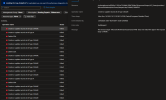
Nothing is logged in /var/log/plesk/panel.log. However, the Azure Activity Log of the DNS zone shows the extension’s app registration receiving 400 Bad Request on record set writes of every type (A, CNAME, TXT):
"The resource type 'Microsoft.Network/dnsZones/CNAME' does not match the type in the request body 'CNAME'."
Operation: Microsoft.Network/dnsZones/CNAME/write, status Failed, BadRequest.
It looks like the extension sends the short record type (“CNAME”, “A”, …) in the type field of the request body. Azure appears to have recently started validating this field against the resource type in the URL, apparently only on some backends, which would explain why the failures are intermittent. The DNSControl project hit the same issue and fixed it by no longer sending the type field: fix(AZURE_DNS): bug: intermittent "resource type does not match the type in the request body" errors by TomOnTime · Pull Request #5040 · DNSControl/dnscontrol
Two related observations:
Re-saving a missing record in Plesk sometimes pushes it successfully, which matches the intermittent behavior.
Plesk version and microupdate number: Plesk Obsidian 18.0.82.3
Hello,
On two Plesk servers with the Microsoft Azure DNS extension (1.2.5-8214), DNS records are intermittently not synchronized to Azure DNS. Records that exist in Plesk are missing in Azure, and the set of missing records changes between zone updates.
Nothing is logged in /var/log/plesk/panel.log. However, the Azure Activity Log of the DNS zone shows the extension’s app registration receiving 400 Bad Request on record set writes of every type (A, CNAME, TXT):
"The resource type 'Microsoft.Network/dnsZones/CNAME' does not match the type in the request body 'CNAME'."
Operation: Microsoft.Network/dnsZones/CNAME/write, status Failed, BadRequest.
It looks like the extension sends the short record type (“CNAME”, “A”, …) in the type field of the request body. Azure appears to have recently started validating this field against the resource type in the URL, apparently only on some backends, which would explain why the failures are intermittent. The DNSControl project hit the same issue and fixed it by no longer sending the type field: fix(AZURE_DNS): bug: intermittent "resource type does not match the type in the request body" errors by TomOnTime · Pull Request #5040 · DNSControl/dnscontrol
Two related observations:
- The extension still calls the API with api-version 2016-04-01, which does not support CAA record sets (“No registered resource provider found for location ‘global’ and API version ‘2016-04-01’ for type ‘dnszones/CAA’”), so any zone with a CAA record fails to sync.
- The extension repeatedly attempts “Delete SOA”, which Azure always rejects.
Re-saving a missing record in Plesk sometimes pushes it successfully, which matches the intermittent behavior.