Facebook
 Twitter
- Server operating system version
- CentOS Linux 7 (Core)
- Plesk version and microupdate number
- 18.0.65 #1
Hello! I use Plesk at work, and keep a handful of subscriptions and domains running restricted Plesk control panels.
My client has access to it, and after an update earlier this month, they cannot find some options for blacklisting domains and spammers. I can see them as an admin under Plesk Email Security just fine. Was it the update or am I missing something? Would reinstalling plugins help like this thread?
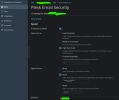
I've turned on all related options on Tools & settings > Restricted Mode Settings > Mail. Under their domain > Mail > Mail accounts they claim it's missing, like this:

Any input is much appreciated, thanks everyone and have a good day
My client has access to it, and after an update earlier this month, they cannot find some options for blacklisting domains and spammers. I can see them as an admin under Plesk Email Security just fine. Was it the update or am I missing something? Would reinstalling plugins help like this thread?
I've turned on all related options on Tools & settings > Restricted Mode Settings > Mail. Under their domain > Mail > Mail accounts they claim it's missing, like this:
Any input is much appreciated, thanks everyone and have a good day