
 Facebook
 Twitter
SebastianBerlin
New Pleskian
- Server operating system version
- Nextcloud v32.0.3, Nextcloud (Plesk extension) v1.7.2-6622, PHP v8.4.15, Ubuntu v24.04.3 LTS, Apache v2.4.58, nginx v1.28.0
- Plesk version and microupdate number
- 18.0.74 Update 3
Via the Plesk module I've installed and setup a fresh Nextcloud installation. After changing the admin at the Nextcloud instance (new admin, deleting the old one) the old admin is still in charge at the Plesk module, even though the user doesn't exist at all.
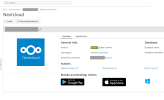
I don't see a way to change the admin to the new one.
Also every ten minutes the module tries to login/ping the already deleted user. At nextcloud.tld/settings/admin/logging there are many warnings:
Details:
Could you please fix that and/or tell me how to edit the settings? Thank you.
I don't see a way to change the admin to the new one.
Also every ten minutes the module tries to login/ping the already deleted user. At nextcloud.tld/settings/admin/logging there are many warnings:
Code:
Login failed: 'DELETED_ADMIN_USERNAME' (Remote IP: 'XYZ')Details:
Code:
{
  "reqId": "XYZ",
  "level": 2,
  "time": "2025-12-21T13:59:01+01:00",
  "remoteAddr": "XYZ",
  "user": "--",
  "app": "core",
  "method": "GET",
  "url": "/ocs/v2.php/cloud/users/DELETED_ADMIN_USERNAME?format=json",
  "message": "Login failed: 'DELETED_ADMIN_USERNAME' (Remote IP: 'XYZ')",
  "userAgent": "Mozilla/5.0 (compatible; Nextcloud Plesk Extension/1.7.2; XYZ)",
  "version": "32.0.3.2",
  "data": {
    "app": "core"
  },
  "id": "XYZ"
}
Could you please fix that and/or tell me how to edit the settings? Thank you.


