• The new Python extension is now available. It allows customers to deploy and manage WSGI-based Python applications on their websites directly from Plesk.
  • The Plesk Mobile apps for iOS and Android and the Plesk Mobile Center extension have been deprecated, and are no longer available for new installations. In Plesk Obsidian 18.0.84, the Plesk Mobile Center extension will be removed from servers during the upgrade, and the Plesk Mobile apps will lose their server management features.
  • The Social Login extension has been deprecated and will be removed in Plesk Obsidian 18.0.84. After that, it will no longer be possible to log in to Plesk with a Google, Facebook, GitHub account, or with a passkey. Plesk usernames and passwords, as well as logging in with a WebPros Account, are not affected.

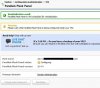
Re-initialise Parallels Plesk Panel

Juc1

New Pleskian
Hi all,

I am trying to return my Debian 6 VPS to its original state ie as configured by my host and before I changed anything.

After hitting 're-initialise' and then 'ok' I get 'Please wait while Parallels Plesk Panel is being configured inside your VPS' - screenshots attached - but then nothing seems to happen ie no change to my VPS.

Any suggestions please?

Thank you
 

Attachments

  • reinitialisea.jpg
    reinitialisea.jpg
    76.9 KB · Views: 6
  • reinitialiseb.jpg
    reinitialiseb.jpg
    39.4 KB · Views: 7
Last edited:
As I see by status it can mean that task still in progress. Can you check logs or ask POA administrator about task progress?
 
This I think depends on the VPS containers you are using ...Tried asking the host?
 
Back
Top