• Debian 11 is approaching its end-of-life (vendor EOL date - August 31, 2026). Plesk Obsidian 18.0.80 will be the last release to support it.
    If you are running Plesk Obsidian on Debian 11, we recommend you upgrade those servers to Debian 12 using our dist-upgrade tool.
  • We plan to deprecate and remove the support for XML RPC protocol versions earlier than 1.6.9.1 in Plesk Obsidian 18.0.82. We strongly recommend that you update all existing integrations using earlier versions of the XML RPC protocol to comply with the version 1.6.9.1 specification.

Resize root partition

Paresh

New Pleskian
Dear All,

I am using Plesk 12.0.18 Update #74 on Cent OS 6.5.
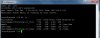
Currently my root partition is almost full and creating backup issue. I am not able to take backup. Please suggest how to resize it. And what is best practise for partition size?

Plesk.jpg
 
@Paresh,

To be honest, your partitions seem to be a little bit strange, given the distribution of disk space.

In general, it is not adviceable to change the partitions, that would be equivalent to asking for problems and/or resulting in the necessity to (partially or fully) re-install the server.

A potential alternative and solution to your problem is to change the DUMP_D variable in the /etc/psa/psa.conf file.

The value for the DUMP_D variable could or should be something in the mounted directory /home, for instance /home/backup would suffice.

When changing the DUMP_D variable, the sw-cp-server should be restarted afterwards, in order to have the changes take effect.

Hope the above helps a little bit.

Regards....
 
Back
Top