
 Facebook
 Twitter
Hi,
today i tried switching on Nginx Cache on one of our wordpress installs within the Wordpress Toolkit.
After switching this on I was not able to follow symlinks on the Wordpress instance, I always got a 404 nginx error.
So i disabled the nginx caching in the Wordpress Toolkit but the issue persists.
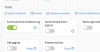
Als o deactived all nginx proxy stuff within the domain settings and nothing helps! I found out that within the PHP Settings PHP-FPM is set to "served by nginx" and I can't change this back to Apache! Only Nginx is available now.

I tried the nginx cache with a second wordpress instance -> exact same issues. This only happens on installs where wordpress Toolkit is used to enable nginx cache! I guess this is a bug and my to wordpress installs are completly useless right now!
Can you guys please help me to get the run PHP served by Apache FPM back!?
EDIT: Newest CentOS Version 7 and newest Onyx 17.8
today i tried switching on Nginx Cache on one of our wordpress installs within the Wordpress Toolkit.
After switching this on I was not able to follow symlinks on the Wordpress instance, I always got a 404 nginx error.
So i disabled the nginx caching in the Wordpress Toolkit but the issue persists.
Als o deactived all nginx proxy stuff within the domain settings and nothing helps! I found out that within the PHP Settings PHP-FPM is set to "served by nginx" and I can't change this back to Apache! Only Nginx is available now.
I tried the nginx cache with a second wordpress instance -> exact same issues. This only happens on installs where wordpress Toolkit is used to enable nginx cache! I guess this is a bug and my to wordpress installs are completly useless right now!
Can you guys please help me to get the run PHP served by Apache FPM back!?
EDIT: Newest CentOS Version 7 and newest Onyx 17.8


