• Halloween is coming! To celebrate the occasion, we dusted off a couple of old skins, and even created a brand new one (Pixel).
    To get into the festive spirit, install the Skins extension.
  • The new Python extension is now available. It allows customers to deploy and manage WSGI-based Python applications on their websites directly from Plesk.
  • The Plesk Mobile apps for iOS and Android and the Plesk Mobile Center extension have been deprecated, and are no longer available for new installations. In Plesk Obsidian 18.0.84, the Plesk Mobile Center extension will be removed from servers during the upgrade, and the Plesk Mobile apps will lose their server management features.
  • The Social Login extension has been deprecated and will be removed in Plesk Obsidian 18.0.84. After that, it will no longer be possible to log in to Plesk with a Google, Facebook, GitHub account, or with a passkey. Plesk usernames and passwords, as well as logging in with a WebPros Account, are not affected.

Server Error: 500 Zend_Db_Statement_Exception

jjonsson

New Pleskian
Server operating system version
Debian 10
Plesk version and microupdate number
Obsidian 18.0.50
If I try to enter Wordpress in the menu I get the following error:
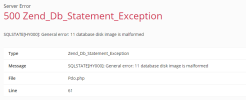
1675757770195.png

If I check Wordpress database, it's corrupt. How do I recover it ?


Code:
root@plesk:/usr/local/psa/var/modules/wp-toolkit# sqlite3 /usr/local/psa/var/modules/wp-toolkit/wp-toolkit.sqlite3
SQLite version 3.27.2 2019-02-25 16:06:06
Enter ".help" for usage hints.
sqlite> pragma integrity_check;
Error: database disk image is malformed
sqlite>

I don't have a backup :oops:
 
Without a backup this will be a problem. I am not aware of a way to restore the SQLite DB. In my documentation here it is suggested to remove the module affected (which would be WP Toolkit) from the server and reinstall it. This however will mean that the WP Toolkit configuration data will be lost. Before doing this I also recommend to create a full server backup, because a corrupt file is mostly seen on a corrupt file system. It can mean that there are general underlying issues with the file system.
 
# ll /usr/local/psa/var/modules/wp-toolkit/wp-toolkit.sqlite3
Does it still exist? Could you try to rename it if still exists?
 
Back
Top