• Halloween is coming! To celebrate the occasion, we dusted off a couple of old skins, and even created a brand new one (Pixel).
    To get into the festive spirit, install the Skins extension.
  • The new Python extension is now available. It allows customers to deploy and manage WSGI-based Python applications on their websites directly from Plesk.
  • The Plesk Mobile apps for iOS and Android and the Plesk Mobile Center extension have been deprecated, and are no longer available for new installations. In Plesk Obsidian 18.0.84, the Plesk Mobile Center extension will be removed from servers during the upgrade, and the Plesk Mobile apps will lose their server management features.
  • The Social Login extension has been deprecated and will be removed in Plesk Obsidian 18.0.84. After that, it will no longer be possible to log in to Plesk with a Google, Facebook, GitHub account, or with a passkey. Plesk usernames and passwords, as well as logging in with a WebPros Account, are not affected.

Noam Harel

Regular Pleskian
Hi

i wanted to have plesk secured with lets encrypt.
i followed this article:
How to secure Plesk login page with Let's Encrypt certificate
which didn't work for some reason. i mean that after doing all of the steps i still get certificate error.
what i did:
1) built a sub-domain
2) pointed an A record and waited for it to propagate
3) create Lets encrypt certificate for the sub-domain
4) in - 'Certificate for securing Plesk' i choose 'Lets Encrypt certificate (server pool)'

after that still shows ssl error

domain to check is: web1.the123.co.il
plesk url: https://185.106.128.171:8443

please your thoughts.

Noam
 
Hi

i wanted to have plesk secured with lets encrypt.
i followed this article:
How to secure Plesk login page with Let's Encrypt certificate
which didn't work for some reason. i mean that after doing all of the steps i still get certificate error.
what i did:
1) built a sub-domain
2) pointed an A record and waited for it to propagate
3) create Lets encrypt certificate for the sub-domain
4) in - 'Certificate for securing Plesk' i choose 'Lets Encrypt certificate (server pool)'

after that still shows ssl error

domain to check is: web1.the123.co.il
plesk url: https://185.106.128.171:8443

please your thoughts.

Noam
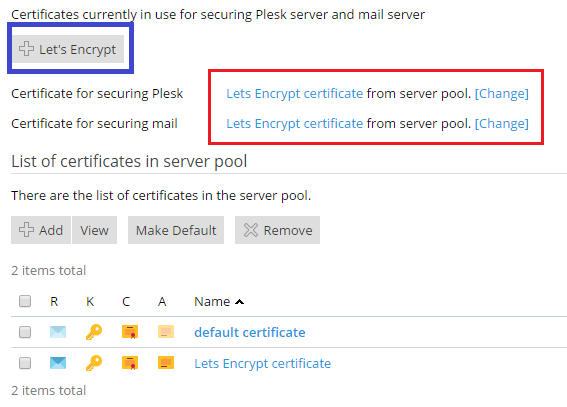
Hello Noam, since the last letsencrypt extension update, it's not needed to create a sub-domain anymore.
You should find a button letsencrypt and then you will have just to choose the domain or subdomain you want to protect with a SSL certificate :

78764.png
 
Hello Noam, since the last letsencrypt extension update, it's not needed to create a sub-domain anymore.
You should find a button letsencrypt and then you will have just to choose the domain or subdomain you want to protect with a SSL certificate :

78764.png


sorry i get the same result,
 
Hi Noam Harel,

your Plesk - URL


is secured and valid. Pls. see as well:


Your IP "185.106.128.171" doesn't have a reverse entry and as a result, your IP doesn't resolve to a FQDN.

=> Reverse DNS Lookup for 185.106.128.171

( Pls. contact your IP provider, if you desire to change that! )​
thanks!
so, in conclusion: the plesk access with SSL is only with the domain name and not the IP address.
 
It's not possible de generate a SSL certificate for an IP with Let's Encrypt.
Nor is it possible with other CA's. It's deprecated and a serious security issue.
I believe there are some exceptions, but I'm convinced these don't apply on you.
 
Back
Top