• The APS Catalog has been deprecated and removed from all Plesk Obsidian versions.
    Applications already installed from the APS Catalog will continue working. However, Plesk will no longer provide support for APS applications.
  • Please be aware: with the Plesk Obsidian 18.0.78 release, the support for the ngx_pagespeed.so module will be deprecated and removed from the sw-nginx package.

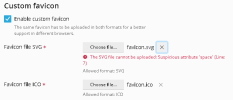
Input Standard .svg file not accepted as favicon file, workaround: place it into directory directly

Bitpalast

Plesk addicted!
Plesk Guru
Server operating system version
CentOS 7.9
Plesk version and microupdate number
latest
... and it is a really simply .svg file that works correctly when opened in a browser directly.

1658218853662.png
 
A few tests later it turns out that the file is perfectly fine. It seems to be a security overdose in Plesk. Anyway, not a problem. We'll upload the file directly and place it into /usr/local/psa/admin/htdocs/images. No need to do this through GUI.
 
Submitted as ID [PPS-14019], because on further tests I could not reliably upload sanitized files either.
 
Now registered as a bug PPPM-13928
In the meanwhile, the xml:space attribute can be removed from the svg files for example, with sed:
Code:
# sed -i 's/ xml:space.*">/>/' samples-svgrepo-com-min.svg
 
Back
Top