• Debian 11 is approaching its end-of-life (vendor EOL date - August 31, 2026). Plesk Obsidian 18.0.80 will be the last release to support it.
    If you are running Plesk Obsidian on Debian 11, we recommend you upgrade those servers to Debian 12 using our dist-upgrade tool.
  • We plan to deprecate and remove the support for XML RPC protocol versions earlier than 1.6.9.1 in Plesk Obsidian 18.0.82. We strongly recommend that you update all existing integrations using earlier versions of the XML RPC protocol to comply with the version 1.6.9.1 specification.

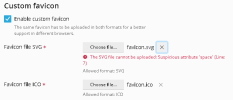
Input Standard .svg file not accepted as favicon file, workaround: place it into directory directly

Bitpalast

Plesk addicted!
Plesk Guru
Server operating system version
CentOS 7.9
Plesk version and microupdate number
latest
... and it is a really simply .svg file that works correctly when opened in a browser directly.

1658218853662.png
 
A few tests later it turns out that the file is perfectly fine. It seems to be a security overdose in Plesk. Anyway, not a problem. We'll upload the file directly and place it into /usr/local/psa/admin/htdocs/images. No need to do this through GUI.
 
Submitted as ID [PPS-14019], because on further tests I could not reliably upload sanitized files either.
 
Now registered as a bug PPPM-13928
In the meanwhile, the xml:space attribute can be removed from the svg files for example, with sed:
Code:
# sed -i 's/ xml:space.*">/>/' samples-svgrepo-com-min.svg
 
Back
Top