PeopleInside Regular Pleskian Sep 30, 2025 #1 Server operating system version Ubuntu 24.04.3 LTS Plesk version and microupdate number 18.0.72 Update #3 Ubuntu 24.04.3 LTS Plesk 18.0.72 Update #3 When I go on extension and search for Support SSH Access, then open the page for install the extension no install button are showed. Why?
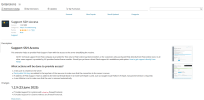
Ubuntu 24.04.3 LTS Plesk 18.0.72 Update #3 When I go on extension and search for Support SSH Access, then open the page for install the extension no install button are showed. Why?
Martin Dias QA Engineer Staff member Sep 30, 2025 #2 Can you try again and go over Categories -> Help & Troubleshooting to open it, I suspect that it got wrongly cached if it is a fresh server
Can you try again and go over Categories -> Help & Troubleshooting to open it, I suspect that it got wrongly cached if it is a fresh server
PeopleInside Regular Pleskian Sep 30, 2025 #3 Thank you for the reply. Yes is a fresh server and I tried again but the install button is not present
Thank you for the reply. Yes is a fresh server and I tried again but the install button is not present
Sebahat.hadzhi Community Manager Staff member Sep 30, 2025 #4 I am not sure why the button would be missing, but could you please try installing the extension via the command line and let us know if that triggers any errors/warnings: Code: plesk bin extension --install support-access
I am not sure why the button would be missing, but could you please try installing the extension via the command line and let us know if that triggers any errors/warnings: Code: plesk bin extension --install support-access
PeopleInside Regular Pleskian Sep 30, 2025 #5 plesk bin extension --install support-access The extension was successfully installed. It works thanks
plesk bin extension --install support-access The extension was successfully installed. It works thanks