• Debian 11 is approaching its end-of-life (vendor EOL date - August 31, 2026). Plesk Obsidian 18.0.80 will be the last release to support it.
    If you are running Plesk Obsidian on Debian 11, we recommend you upgrade those servers to Debian 12 using our dist-upgrade tool.
  • We plan to deprecate and remove the support for XML RPC protocol versions earlier than 1.6.9.1 in Plesk Obsidian 18.0.82. We strongly recommend that you update all existing integrations using earlier versions of the XML RPC protocol to comply with the version 1.6.9.1 specification.

Resolved Ubuntu 24.04.3 LTS cannot install extension Support SSH Access

PeopleInside

Regular Pleskian
Server operating system version
Ubuntu 24.04.3 LTS
Plesk version and microupdate number
18.0.72 Update #3
Ubuntu 24.04.3 LTS
Plesk 18.0.72 Update #3

When I go on extension and search for Support SSH Access, then open the page for install the extension no install button are showed.
Why?
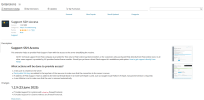
1759218073039.png
 
Can you try again and go over Categories -> Help & Troubleshooting to open it, I suspect that it got wrongly cached if it is a fresh server
 
I am not sure why the button would be missing, but could you please try installing the extension via the command line and let us know if that triggers any errors/warnings:

Code:
plesk bin extension --install support-access
 
Back
Top