• We value your experience with Plesk during 2025
    Plesk strives to perform even better in 2026. To help us improve further, please answer a few questions about your experience with Plesk Obsidian 2025.
    Please take this short survey:

    https://survey.webpros.com/
  • On Plesk for Linux mod_status is disabled on upgrades to improve Apache security.
    This is a one-time operation that occurs during an upgrade. You can manually enable mod_status later if needed.

Resolved Ubuntu 24.04.3 LTS cannot install extension Support SSH Access

PeopleInside

Regular Pleskian
Server operating system version
Ubuntu 24.04.3 LTS
Plesk version and microupdate number
18.0.72 Update #3
Ubuntu 24.04.3 LTS
Plesk 18.0.72 Update #3

When I go on extension and search for Support SSH Access, then open the page for install the extension no install button are showed.
Why?
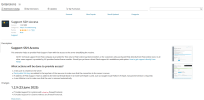
1759218073039.png
 
Can you try again and go over Categories -> Help & Troubleshooting to open it, I suspect that it got wrongly cached if it is a fresh server
 
I am not sure why the button would be missing, but could you please try installing the extension via the command line and let us know if that triggers any errors/warnings:

Code:
plesk bin extension --install support-access
 
Back
Top