• The APS Catalog has been deprecated and removed from all Plesk Obsidian versions.
    Applications already installed from the APS Catalog will continue working. However, Plesk will no longer provide support for APS applications.
  • Please be aware: with the Plesk Obsidian 18.0.78 release, the support for the ngx_pagespeed.so module will be deprecated and removed from the sw-nginx package.

Issue Upgrading to .NET 5.0 in VPS Obsidian v18.0.55

threeCard

New Pleskian
Server operating system version
Windows 2022
Plesk version and microupdate number
Obsidian 18.0.55
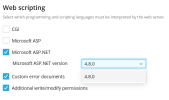
I am trying to change my Plesk Obsidian 18.0.55 VPS to be able to run .NET 5.0 or above but the only option is 4.8. How can I be able to get 5.0 or the latest version of .NET in my VPS?
1707332551581.png
 
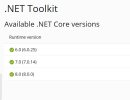
I wonder where you saw a newer ASP.NET version than 4.8. The latest is 4.8.1. You probably do not mean ASP.NET, but ASP.NET Core. The ASP.NET version is 4.8, that is correct, there is no newer version.

References:
Software Requirements for Plesk Obsidian (section "Web Scripting", ASP.NET support up to 4.x)
 
I wonder where you saw a newer ASP.NET version than 4.8. The latest is 4.8.1. You probably do not mean ASP.NET, but ASP.NET Core. The ASP.NET version is 4.8, that is correct, there is no newer version.

References:
Software Requirements for Plesk Obsidian (section "Web Scripting", ASP.NET support up to 4.x)
1707399302214.png

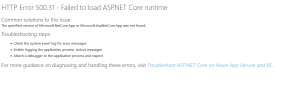
I think you are right, however how can i get past this error?
 
View attachment 25467

I think you are right, however how can i get past this error?
Here is our web config file

Code:
<?xml version="1.0" encoding="utf-8"?>
<configuration>
  <location path="." inheritInChildApplications="false">
    <system.webServer>
      <modules>
        <remove name="WebDAVModule" />
      </modules>
      <handlers>
        <remove name="WebDAV" />
        <add name="aspNetCore" path="*" verb="*" modules="AspNetCoreModuleV2" resourceType="Unspecified" />
      </handlers>
      <aspNetCore processPath="dotnet" arguments=".\api.dll" stdoutLogEnabled="false" stdoutLogFile=".\logs\stdout" hostingModel="inprocess" />
    </system.webServer>
  </location>
</configuration>
 
I'm not sure if this makes sense because I don't use ASP.NET, but I read on StackOverflow that this can be fixed by installing the "Hosting Bundle":

 
I'm not sure if this makes sense because I don't use ASP.NET, but I read on StackOverflow that this can be fixed by installing the "Hosting Bundle":

I read that too, how would i go about installing that in plesk though? Where would I upload it FTP?
 
Back
Top