• Debian 11 is approaching its end-of-life (vendor EOL date - August 31, 2026). Plesk Obsidian 18.0.80 will be the last release to support it.
    If you are running Plesk Obsidian on Debian 11, we recommend you upgrade those servers to Debian 12 using our dist-upgrade tool.
  • We plan to deprecate and remove the support for XML RPC protocol versions earlier than 1.6.9.1 in Plesk Obsidian 18.0.82. We strongly recommend that you update all existing integrations using earlier versions of the XML RPC protocol to comply with the version 1.6.9.1 specification.

Issue Upgrading to .NET 5.0 in VPS Obsidian v18.0.55

threeCard

New Pleskian
Server operating system version
Windows 2022
Plesk version and microupdate number
Obsidian 18.0.55
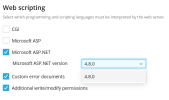
I am trying to change my Plesk Obsidian 18.0.55 VPS to be able to run .NET 5.0 or above but the only option is 4.8. How can I be able to get 5.0 or the latest version of .NET in my VPS?
1707332551581.png
 
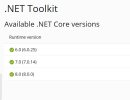
I wonder where you saw a newer ASP.NET version than 4.8. The latest is 4.8.1. You probably do not mean ASP.NET, but ASP.NET Core. The ASP.NET version is 4.8, that is correct, there is no newer version.

References:
Software Requirements for Plesk Obsidian (section "Web Scripting", ASP.NET support up to 4.x)
 
I wonder where you saw a newer ASP.NET version than 4.8. The latest is 4.8.1. You probably do not mean ASP.NET, but ASP.NET Core. The ASP.NET version is 4.8, that is correct, there is no newer version.

References:
Software Requirements for Plesk Obsidian (section "Web Scripting", ASP.NET support up to 4.x)
1707399302214.png

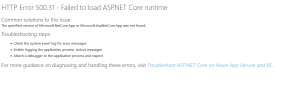
I think you are right, however how can i get past this error?
 
View attachment 25467

I think you are right, however how can i get past this error?
Here is our web config file

Code:
<?xml version="1.0" encoding="utf-8"?>
<configuration>
  <location path="." inheritInChildApplications="false">
    <system.webServer>
      <modules>
        <remove name="WebDAVModule" />
      </modules>
      <handlers>
        <remove name="WebDAV" />
        <add name="aspNetCore" path="*" verb="*" modules="AspNetCoreModuleV2" resourceType="Unspecified" />
      </handlers>
      <aspNetCore processPath="dotnet" arguments=".\api.dll" stdoutLogEnabled="false" stdoutLogFile=".\logs\stdout" hostingModel="inprocess" />
    </system.webServer>
  </location>
</configuration>
 
I'm not sure if this makes sense because I don't use ASP.NET, but I read on StackOverflow that this can be fixed by installing the "Hosting Bundle":

 
I'm not sure if this makes sense because I don't use ASP.NET, but I read on StackOverflow that this can be fixed by installing the "Hosting Bundle":

I read that too, how would i go about installing that in plesk though? Where would I upload it FTP?
 
Back
Top