
 Facebook
 Twitter
Hello,
I have a problem with my installation of Plesk 11.5.3, I already try this:
defpackagemng.exe --update --fix, but I can not fix the problem.
Server Information:
- Windows server 2008 Standard
- IIS 7 Installed
- FTP Installed
- Plesk 11.5.3 Installed
Error:
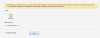
Warning: For Panel to work, you need to select the default components from the list below. Make sure that the components you select are properly installed and configured. It is possible to change your selection afterwards.
Tools
Refresh
Web Server *
Microsoft IIS 7.0
* Required fields
Thank you for your help in advance
I have a problem with my installation of Plesk 11.5.3, I already try this:
defpackagemng.exe --update --fix, but I can not fix the problem.
Server Information:
- Windows server 2008 Standard
- IIS 7 Installed
- FTP Installed
- Plesk 11.5.3 Installed
Error:
Warning: For Panel to work, you need to select the default components from the list below. Make sure that the components you select are properly installed and configured. It is possible to change your selection afterwards.
Tools
Refresh
Web Server *
Microsoft IIS 7.0
* Required fields
Thank you for your help in advance


