• The APS Catalog has been deprecated and removed from all Plesk Obsidian versions.
    Applications already installed from the APS Catalog will continue working. However, Plesk will no longer provide support for APS applications.
  • Please be aware: with the Plesk Obsidian 18.0.78 release, the support for the ngx_pagespeed.so module will be deprecated and removed from the sw-nginx package.

Issue Wordpress installation failed (Plesk for Windows)

Brovning

New Pleskian
Server operating system version
Windows
Plesk version and microupdate number
18.0.58
Hello,

I'm trying to install Wordpress with:
PLESK 18.x for WINDOWS
PHP 7.4

I'm starting the installation in customer panel:
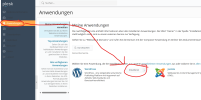
1741450768017.png

Afterwards the installation is running:
1741450802275.png

After some time the following page is opened:

1741450826205.png


How can I identify the rootcause?
 
I have tried to install Wordpress with the "WP Toolkit":
1741461885210.png
Error message:
"Unable to unpack archive C:\Inetpub\vhosts\***\httpdocs\wp67cc98d30fa4c8.41816230\wordpress-6.7.2.zip to C:\Inetpub\vhosts\***\httpdocs\wp67cc98d30fa4c8.41816230 at (UnpackArchive:: onRunAsUser line 2832) at Unable to unpack archive C:\Inetpub\vhosts\***\httpdocs\wp67cc98d30fa4c8.41816230\wordpress-6.7.2.zip(UnpackArchive:: onRunAsUser line 2835)"

Any ideas?
 
Hello, @Brovning . Could you please double-check the Hard Disk Quota set in Domains > example.com > Web Hosting and make sure it is not too low? If possible, please temporarily set it to unlimited for the sake of testing.
 
Hello, @Brovning . Could you please double-check the Hard Disk Quota set in Domains > example.com > Web Hosting and make sure it is not too low? If possible, please temporarily set it to unlimited for the sake of testing.
Hello @Sebahat.hadzhi,

hard disk quota is set to unlimited.
I have tried it with another domain. There the installation finished successfully.

Difference:
sub.domain.com --> failed
domain.com --> success

Is it possible to install Wordpress using a subdomain as main domain for the account?
 
Thank you for the confirmation, @Brovning You should be able to install WordPress on a subdomain even if it's set as the primary one for the subscription. The root cause of the issue lays somewhere else. My other guess would be a permission issue. Could you please try running the Plesk repaid utility by executing the following command via RDP:

plesk repair fs

If that doesn't sort out the issue, I would recommend getting in touch with our support team for further investigation.
 
Back
Top