Facebook
 Twitter
kapil soni
New Pleskian
Hi,
I Installed one plugin on my website "http://www.hootex.com/wp-content/plugins/Share-This-Image/sharer.php"
It's giving "403 Forbidden" error while running.
plugin developer saying it's a file/directory permission issue.
I have set the permissions to 777 for every file and directory of this plugin but the problem not solved.
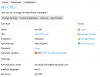
I see there is USER and GROUP in my plesk file manager. my USER is hootex and GROUP is psacln
(Please find attached photo)
I have read somewhere that the default group is psaserv which can execute any files.
I guess it's a user group issue, that's why my files are not executing.
I have tried to change the group of my user but can't see any option for this in my plesk control panel. I am using Plesk Web Pro Edition 12.5.30 update #22
Can anyone please help me how to change the user group in plesk panel so I can run my plugins properly.
Or any alternate method to run/execute my plugin smoothly.
I am new with plesk and simple web blogger with zero knowledge of server commands. pls help
Thanks
Regards
Kapil
I Installed one plugin on my website "http://www.hootex.com/wp-content/plugins/Share-This-Image/sharer.php"
It's giving "403 Forbidden" error while running.
plugin developer saying it's a file/directory permission issue.
I have set the permissions to 777 for every file and directory of this plugin but the problem not solved.
I see there is USER and GROUP in my plesk file manager. my USER is hootex and GROUP is psacln
(Please find attached photo)
I have read somewhere that the default group is psaserv which can execute any files.
I guess it's a user group issue, that's why my files are not executing.
I have tried to change the group of my user but can't see any option for this in my plesk control panel. I am using Plesk Web Pro Edition 12.5.30 update #22
Can anyone please help me how to change the user group in plesk panel so I can run my plugins properly.
Or any alternate method to run/execute my plugin smoothly.
I am new with plesk and simple web blogger with zero knowledge of server commands. pls help
Thanks
Regards
Kapil