
 Facebook
 Twitter
raytracy
Basic Pleskian
Windows Server 2016+Plesk Onyx 17.5.3 Update #3+MS-SQL 2014 SP2
Apply update#4 from plesk panel, show the following error on top:
(The chinese word in the first line said: system cannot find specified file)
Plesk updater stalled and ask me do not do any operation before updated:
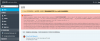
Any advice?
Apply update#4 from plesk panel, show the following error on top:
ERROR: Exception: Unable to get administrator password: 系統找不到指定的檔案。 (Error code 2) at Unable to connect to pipe \\.\pipe\P_852d9c24-3ccf-49a6-9d1d-4eef2ed8edc7<br> at (Con::ClientOverlappedPipe::create line 503)<br> at getPassword('pwd' (PleskSrvClient::getPassword line 208)<br> at (zif_get_admin_password line 260) (Helper.php:68)<br />
<br><a href='Help Center' target='_blank'>Search for related Knowledge Base articles</a>
(PleskSrvClient::getPassword line 208)<br> at (zif_get_admin_password line 260) (Helper.php:68)<br /><br><a href='Help Center' target='_blank'>Search for related Knowledge Base articles</a>
(The chinese word in the first line said: system cannot find specified file)
Plesk updater stalled and ask me do not do any operation before updated:
Any advice?


